 Dhaval G.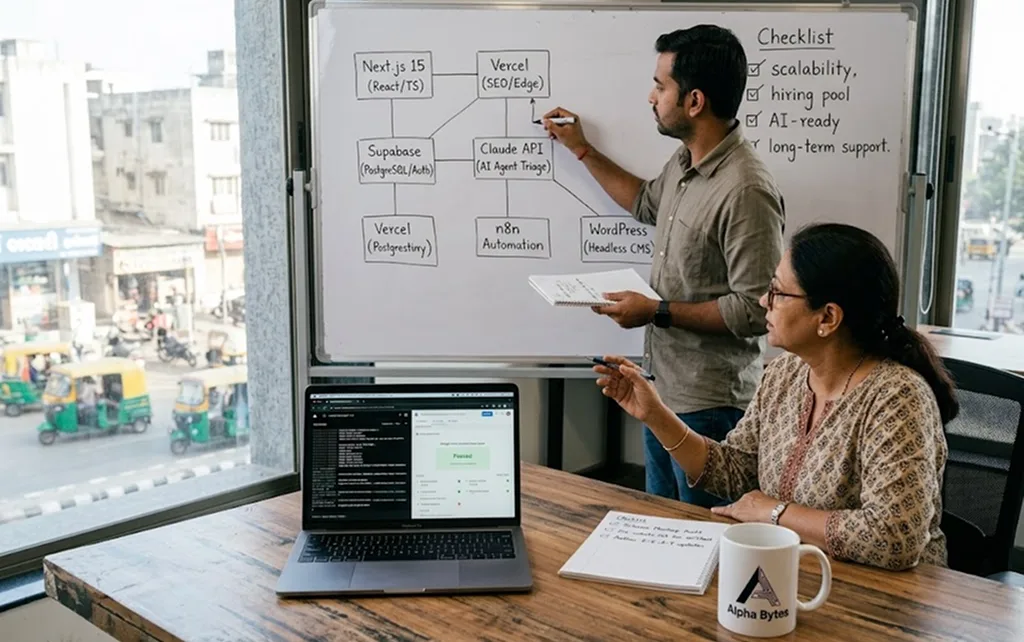
A founder came to us in late 2025 with a problem that is expensive, demoralising, and completely preventable: his development team had built his SaaS product's MVP on a technology stack chosen because one senior developer liked it and the CTO had experience with it at a previous company. Eighteen months later, the product had 400 paying customers, a growing feature backlog, and a codebase that three different agency quotes had described as "not scalable without a significant rewrite." The rewrite was eventually quoted at ₹28,00,000. More than three times what the original MVP had cost. Choosing the wrong tech stack leads to a full refactor within 18 months for 70% of startups and this founder was solidly in that 70%.
Choosing the best tech stack for your business in 2026 is the most consequential technical decision you will make and it's almost always made without enough information, under time pressure, by people whose biases are rarely declared. This guide is different. At Alpha Bytes, we build websites and web applications daily on Next.js, Node.js, Supabase, WordPress, and Vercel depending on what each project actually needs. We've made stack choices that saved clients months of development time and made choices we'd make differently with hindsight. This is the guide we wish existed when we started written from the perspective of people who build, not just advise.
Why the Wrong Tech Stack Is So Expensive and Why It Happens
A tech stack is the combination of programming languages, frameworks, databases, hosting platforms, and tools used to build and run your website or web application. Get it right and your product ships faster, scales cleanly, and costs less to maintain over time. Get it wrong and every new feature costs more, every developer you hire takes longer to onboard, and a rewrite eventually becomes unavoidable.
The reason wrong choices happen is rarely negligence. It's almost always one of three forces:
Force 1: The "We Know This" Trap
The most common reason for a poor stack choice: the team chose what they already knew. This isn't inherently wrong familiarity produces faster initial development. The problem is that "what we know" optimizes for development speed at month one and ignores scalability at month eighteen. A stack that one developer can build quickly is not necessarily the stack that a team of five can maintain cleanly, or that the next developer you hire can onboard to without weeks of orientation.
Force 2: The "It's Trending" Trap
Choosing a tech stack in 2026 is not about chasing buzz. It is about making smart trade-offs. The right stack helps your team build faster, stay focused, and avoid painful rework later. The wrong one can drain time, money, and momentum before the product even finds its footing.
Every year, a new framework or tool achieves maximum Twitter visibility and finds its way into architecture decisions made by people who read about it rather than built with it. The right question is not "what's trending?" but "what has a strong enough ecosystem, hiring pool, and documentation base that we can depend on it for the next three years?" Trends are one-year signals. Architectural decisions have three-to-five year consequences.
Force 3: The "We'll Fix It Later" Trap
Technical debt the accumulated cost of shortcuts and suboptimal decisions grows exponentially, not linearly. A decision that saves two days of work at month one can cost two weeks at month six and two months at month eighteen. The businesses we've helped through expensive rewrites share one characteristic: the original shortcuts seemed reasonable at the time. They almost always are. The problem is that "later" arrives faster than expected, the codebase is more complex than anticipated, and fixing it costs more than the original build.
The 7-Factor Framework for Choosing Your Tech Stack
Before looking at specific technologies, you need a framework for evaluating them against your specific situation. These seven factors determine which stack is right for your business and they should be evaluated in this order.
Factor 1: What Are You Actually Building?
This sounds obvious, but it's frequently skipped in favor of jumping straight to technology choices. A marketing website has fundamentally different technical requirements from a SaaS application, an e-commerce platform, a healthcare booking system, or an internal business tool. Be precise:
- Marketing/brochure website: primarily static content, blog, contact form, SEO. Performance and maintainability by non-technical staff are the priority.
- E-commerce store: product catalogue, cart, payment processing, order management, inventory. Integration with payment gateways and shipping systems is the priority.
- SaaS web application: user authentication, subscription management, dynamic data, real-time features. Scalability and developer experience are the priority.
- Internal business tool: specific workflow automation, integration with existing business systems. Speed to build and ease of modification are the priority.
- Marketplace or platform: multi-sided transactions, complex data relationships, high concurrency. Architecture and data modelling are the priority.
Each of these has a different optimal stack. A business that tries to use one technology choice for all of them will be suboptimally served by all of it. Choosing the wrong stack leads to costly refactors and technical debt developers choosing the wrong tools for the job end up with a system that's both harder to maintain and slower to build upon.
Factor 2: Who Will Build and Maintain It?
Before finalising the tech stack, consider the team's expertise, security options, scalability, and project duration. Knowledgeable developer communities provide helpful resources, libraries, and troubleshooting support.
The most technically optimal stack is useless if you can't hire developers who know it. Evaluate:
- Your current team: what do they know? Starting with their strengths is legitimate, as long as it doesn't conflict with the project's long-term needs
- Hiring availability: React and TypeScript have enormous developer pools in India, the UK, and globally. More niche technologies have smaller pools, which translates to higher salaries and longer hiring cycles
- Agency and freelancer availability: if you'll rely on external developers, check that the stack has a large enough ecosystem that you're not dependent on one vendor's continued availability
- AI tool compatibility: in 2026, the stack's compatibility with AI coding tools matters. Engineering is now a hybrid workflow. Popular and strictly typed languages like TypeScript have become priorities because AI generates code for them with significantly fewer errors than for dynamic or rare languages.
Factor 3: How Fast Do You Need to Ship?
Speed to first working version matters differently depending on your situation. A startup validating a hypothesis needs to ship in weeks, not months. An enterprise building internal tooling can take a measured approach. A small business replacing an existing system needs to minimize disruption during the transition.
For most startups and product teams, delivery speed is the strongest lever. Faster iteration produces better products because real user feedback is more valuable than any amount of internal planning. Choose a stack that your team can build in, not one that first requires a learning period.
The practical implication: avoid introducing more than one unfamiliar technology in a single project. If your team knows React but not TypeScript, using Next.js (React-based) is a reasonable step. Simultaneously introducing TypeScript, a new database, and a new hosting platform in the same project creates unnecessary risk to your timeline.
Factor 4: What Does Your Growth Trajectory Look Like?
A stack that handles 1,000 users is not necessarily the same stack that handles 100,000 users efficiently. But optimizing for 100,000 users when you have 100 wastes enormous engineering time on problems you don't have yet.
The right approach: choose a stack that handles 10x your current scale comfortably, with a clear path to 100x if your growth justifies the investment at that point. Horizontal scaling (adding more servers) is generally easier than vertical scaling (rewriting the architecture), so architectures that scale horizontally serverless, containerized microservices, edge computing are inherently lower-risk for high-growth scenarios.
Factor 5: What Is Your Budget?
Tech stack choices have direct cost implications that extend years beyond the initial build:
- Hosting costs: serverless (Vercel, Netlify) can be dramatically cheaper at low traffic, more expensive at very high traffic. Traditional VPS is the opposite.
- Developer costs: popular stacks with large talent pools (React/Node.js) generally have lower hiring costs than niche stacks with specialist premium
- Maintenance costs: stacks with strong LTS (Long-Term Support) commitments and active communities have lower ongoing maintenance costs than fast-moving frameworks that introduce breaking changes frequently
- Third-party service costs: some frameworks have deep integrations with expensive managed services. Evaluate the total cost of the ecosystem, not just the framework itself
Factor 6: Does It Need to Integrate With AI Tools?
In 2026, this factor is non-negotiable. AI isn't a side experiment anymore it's quietly reshaping how buyers discover you, how teams think, and how work actually gets done. If your website or application needs to integrate AI agents that automate your business workflows, connect to AI APIs, use MCP to connect your tech stack to AI agents, or leverage vibe coding tools like Cursor and Lovable your stack choice determines how smooth or painful that integration will be.
TypeScript/JavaScript ecosystems have the best AI tool support. Python has the best machine learning library ecosystem. Rust and Go are excellent for performance-critical backend services. The answer depends on the type of AI integration you need but in 2026, "we'll add AI later" is a more expensive plan than "we'll build it AI-ready from the start."
Factor 7: What Are the Long-Term Ecosystem Risks?
A framework is only as good as its ongoing maintenance, community, and commercial backing. Evaluate:
- Is the framework actively maintained with regular releases?
- Who funds the development open source community, a corporation, or a commercial entity that could sunset it?
- What's the migration path if you need to move away?
- Has the ecosystem been stable, or does it frequently introduce breaking changes?
React (backed by Meta), Next.js (backed by Vercel), and Node.js (backed by the OpenJS Foundation) all score well on these criteria. WordPress is the most battle-tested web CMS in existence, powering 43% of the web. Both are reasonable long-term bets for different use cases.
The Best Tech Stacks for Different Business Types in 2026
Theory is useful. Specific recommendations are more useful. Here are our genuine recommendations at Alpha Bytes, based on what we've actually built and what we'd build today.
Stack 1: The Alpha Bytes Standard Stack (Marketing + Web App + AI-Ready)
This is the stack we use for the majority of our client projects, and the one we'd recommend to most small businesses and startups building a professional website or web application in 2026:
- Frontend: Next.js 15 + React + TypeScript server-side rendering for SEO and performance, TypeScript for code reliability, the most AI-tool-friendly frontend ecosystem available
- Backend: Node.js with Express or Next.js API routes same language across frontend and backend reduces context-switching and hiring complexity
- Database: Supabase (PostgreSQL with real-time capabilities + authentication built in) eliminates the need for a separate auth system, provides real-time features without additional infrastructure, and is significantly cheaper than equivalent managed database solutions
- Hosting: Vercel purpose-built for Next.js, global edge network by default, zero configuration CDN, automatic preview deployments on every commit
- AI Integration: Claude API via MCP for connecting AI capabilities to business data the most reliable integration path for business AI applications in 2026
Based on real-world experience building fast, scalable web applications, Next.js with React has become the default choice for most web projects in 2026. When paired with the right database and hosted on Vercel, you have a stack that scales from startup to enterprise.
Best for: SaaS applications, professional service websites, healthcare platforms, marketplaces, AI-integrated business tools, any project where performance and SEO both matter.
Website speed directly affects your Google rankings and Next.js's static generation and server components make passing Core Web Vitals the default outcome rather than an optimization goal.
Stack 2: WordPress + Headless (Content-Heavy Sites and E-Commerce)
- Frontend: Next.js (fetching from WordPress as a headless CMS via REST API or WPGraphQL)
- CMS: WordPress familiar editorial interface for content teams, enormous plugin ecosystem
- E-Commerce: WooCommerce (within WordPress) or Shopify Storefront API as the commerce backend
- Hosting: Vercel for the frontend, managed WordPress hosting (Kinsta or WP Engine) for the backend
- Database: MySQL (included with WordPress) + optional Supabase for custom application data
This architecture often called "Headless WordPress" gives you the editorial familiarity of WordPress for content teams who don't want to learn a new CMS, combined with the performance and flexibility of Next.js for the visitor-facing frontend. Next.js with React has standardised as the default choice for exceptional performance delivering strong developer experience, performance, and SEO benefits while headless CMS solutions give flexibility and performance that traditional WordPress cannot match on its own.
Best for: Media sites, content-heavy marketing sites, e-commerce brands with large content teams, businesses migrating from WordPress who want better performance without losing their content workflow.
Stack 3: Standard WordPress (Small Business Brochure Sites)
- Framework: WordPress with a performance-optimised theme (Kadence or GeneratePress)
- Page Builder: Gutenberg (native), Elementor or Bricks Builder for visual layout control
- Hosting: Managed WordPress (Kinsta, WP Engine, or Cloudways)
- CDN: Cloudflare free plan non-negotiable for WordPress performance
- Caching: LiteSpeed Cache or WP Rocket
- Security: Wordfence + Cloudflare WAF
WordPress is not the wrong choice for every project. For a small business that needs a professional online presence, plans to publish a blog, and has a team member who will manage content without developer support WordPress, properly configured, is a reasonable and well-supported choice.
The conditions under which we'd steer clients away from WordPress: if the site needs real-time features, complex user authentication, custom application logic, or if the client's primary concern is maximum performance and AI search visibility from day one. In those cases, the WordPress overhead is a cost that compounds over time.
Stack 4: MERN Stack (Full-Stack JavaScript Applications)
- Frontend: React or Next.js
- Backend: Express.js on Node.js
- Database: MongoDB
- Hosting: AWS EC2, DigitalOcean, Hostinger, Godaddy, or Railway
The MERN stack (MongoDB, Express, React, Node) remains a strong choice for teams with specific MongoDB experience and complex, unstructured data requirements. Its weakness in 2026: MongoDB's flexible schema is a liability as much as a benefit for businesses whose data relationships are well-defined PostgreSQL (via Supabase) handles structured business data more reliably and at lower cost for most use cases. MERN is a legitimate choice when the team knows it and the data model genuinely benefits from document storage.
Stack 5: No-Code / Low-Code (Validation and Internal Tools)
Not every product needs custom development. For validating a business idea before investing in engineering, or for building internal tools for a small team, no-code and low-code platforms deliver real value:
- Webflow: the best no-code website builder for professional design quality. Exports clean HTML/CSS. Not suitable for complex application logic.
- Bubble: no-code web application builder. Genuine application logic without writing code. Hits performance and customisation limits at scale.
- Glide or Softr: app builders from Airtable or Google Sheets. Excellent for internal tools and simple customer-facing apps.
- n8n or Make.com: automation-first platforms that can serve as lightweight application backends when the primary requirement is workflow automation
Our honest position: does your business need a website at all, or does it need a no-code tool that gets you to customers in a week? For pre-revenue businesses validating an idea, the answer is often the latter. No-code tools are not a sign of technical weakness they're a sign of resource-efficient decision-making. Build custom when no-code has definitively proven the idea worth the investment.
What We'd Build Today: Alpha Bytes' Own Stack Decisions Explained
This section describes real technology choices Alpha Bytes has made for its own systems and client projects. It's the most E-E-A-T-dense section of this guide the part that only an agency with actual production experience can write.
Why We Chose Next.js as Our Default Framework
We evaluated WordPress, Gatsby, SvelteKit, Remix, and Next.js before standardizing on Next.js for most client projects. The deciding factors were:
- SEO without configuration: Next.js's server-side rendering and static generation mean pages are pre-rendered as HTML by default. SEO is the foundation, not an afterthought.
- Performance out of the box: the Image component, font optimisation, and automatic code splitting produce Core Web Vitals scores that WordPress requires months of plugin work to approach
- AI tool compatibility: Claude Code builds entire features from one prompt in our Next.js codebases with significantly fewer errors than in other frameworks we've tested. The TypeScript-first approach means AI-generated code has fewer runtime surprises.
- Full-stack capability: API routes in Next.js eliminate the need for a separate backend server for most small to medium applications. One codebase, one deployment, one hosting bill.
- Vercel ecosystem: the integration between Next.js and Vercel removes entire categories of DevOps complexity. Preview deployments, edge functions, analytics, and monitoring are all available without configuration.
Why We Chose Supabase Over Firebase and PlanetScale
We evaluated Firebase, PlanetScale, Neon, and Supabase before making Supabase our default database choice. The decisive factors:
- PostgreSQL foundation: Supabase is PostgreSQL under the hood. Every developer who knows SQL can query it. Every tool that works with PostgreSQL works with Supabase. Firebase's NoSQL model creates data structure problems that compound at scale.
- Authentication included: Supabase Auth eliminates an entire category of security complexity and third-party service cost. We don't need a separate auth provider.
- Real-time capabilities: Supabase Realtime handles live data updates without building WebSocket infrastructure. For booking systems, collaborative tools, and dashboards, this eliminates weeks of infrastructure work.
- Cost structure: at small to medium scale, Supabase's free and Pro tiers are dramatically more cost-effective than equivalent Firebase configurations. For clients who grow, the scaling costs are predictable and controllable.
- Open source and self-hostable: if a client ever needs to move away from Supabase's managed service, the underlying database is standard PostgreSQL that can run anywhere. Vendor lock-in risk is minimal.
The One Stack Decision We'd Make Differently
Honesty is part of E-E-A-T. Early in our agency, we built several client projects on React without Next.js standard client-side rendered React applications. The SEO implications of this choice were consistently worse than we'd anticipated. Client-side rendered React pages require JavaScript execution before content appears, which creates Core Web Vitals scores that are hard to fix retroactively and Google crawling behavior that is unpredictable.
If we were starting those projects today, every one of them would be Next.js from day one. The migration cost from client-side React to Next.js is not trivial it's a significant refactor, not a configuration change. The lesson: choose server-rendering capability from the beginning, even if you don't need it immediately. The cost of adding it later far exceeds the cost of including it from the start.
Real Client Stack Decisions: Two Case Studies
Case Study 1: Healthcare Booking Platform (Gujarat)
A multi-specialty clinic came to us needing a patient-facing appointment booking system, a doctor schedule management dashboard, and an AI triage component. The technical requirements: real-time slot availability, concurrent booking handling, WhatsApp API integration, and secure patient data handling.
Stack chosen: Next.js 14 (frontend + API routes), Supabase (real-time database + auth), Node.js (WhatsApp integration worker), Claude API (triage classification), Vercel (deployment).
The decision reasoning: Real-time slot availability required a database with native real-time capabilities Supabase's Realtime was the cleanest solution. The AI triage component needed to be advisory (not autonomous) and integrated into the booking flow Claude API's tool-use capabilities handled this cleanly. Vercel's global edge network reduced API response times for patients booking from different regions of India.
The outcome: The system handles concurrent bookings without conflicts, the AI triage runs in under 800ms per classification, and no-show rates dropped from 28% to 9% after WhatsApp reminder automation was integrated. The stack cost approximately ₹6,300–₹8,400/month in infrastructure, with zero database administrator required.
Case Study 2: E-Commerce Fashion Brand (Surat)
A fashion retailer with 4,200 monthly visitors needed a storefront, product management, payment processing (Razorpay), and AI-powered personalisation. The technical requirements: fast load time on mobile (majority of their traffic), Razorpay integration, and the ability for the owner to update products without developer help.
Stack chosen: Next.js (frontend with server-side personalization), WooCommerce API (product catalogue and order management), Supabase (personalisation data and user behaviour tracking), Vercel (deployment), Razorpay (payments).
The decision reasoning: The client's team needed to manage products through a familiar interface WordPress/WooCommerce was the right choice for the CMS. But the storefront needed server-side personalization for conversion rate improvement, which WordPress alone cannot deliver reliably. The headless approach (Next.js frontend consuming WooCommerce API) gave them editorial familiarity plus modern frontend performance.
The outcome: Mobile PageSpeed score improved from 41 to 89 after migration from a standard WordPress WooCommerce theme. Conversion rate improved from 1.8% to 3.4% after AI personalization was layered in, generating 188% more revenue per visitor with identical traffic.
The Questions to Ask Any Developer or Agency Before They Choose Your Stack
If you're working with a developer or hiring a web developer to build your product, these questions protect you from stack choices made for the developer's convenience rather than your business's needs:
- "What tech stack are you recommending, and why specifically for our project?": A vague answer ("we use React") is not the same as a reasoned answer ("we recommend Next.js because your SEO requirements and expected traffic mean server-side rendering is critical").
- "What are the limitations of this stack for our use case?": Every stack has trade-offs. A developer who can't articulate them is either inexperienced with the stack or isn't being honest.
- "Who else could maintain this codebase if you're unavailable?": The answer reveals how niche or standard the stack choice is.
- "What will this stack cost to run at 10x our current scale?": Forces a conversation about scaling costs before they become a surprise.
- "Is this stack AI-tool-friendly?": In 2026, the answer directly affects how fast you can build and iterate. React/Next.js with TypeScript is a safe bet for broad hiring access and lots of shared knowledge.
- "What does migration away from this stack look like if we need to?": No one plans to migrate, but the ease of migration reveals how locked-in you'll be.
The most honest thing we tell every client before recommending a tech stack: there is no universally correct answer. There is a correct answer for your specific project, your specific team, your specific budget, and your specific growth expectations. Any agency or developer who gives you a confident "this is definitely the right choice" without asking you at least the seven questions in our framework is either prescribing from habit or prescribing from their own comfort zone not from your business requirements.
Tech Stack Red Flags: What to Avoid in 2026
As important as knowing what to choose is knowing what to avoid. These are the red flags we consistently see in expensive client rescue projects:
- Choosing a framework because it's the newest thing: new frameworks have fewer resources, smaller communities, and more breaking changes. The best time to build on a new framework is after it's been stable for two to three years.
- Mixing too many technologies in one project: three different databases, two backend languages, and a microservices architecture for a product with 50 users is over-engineering that produces maintenance nightmares
- No TypeScript on a project with more than one developer: TypeScript's type safety catches entire categories of bugs at compile time. The short-term cost of adopting it is dramatically lower than the long-term cost of debugging runtime errors in plain JavaScript
- Using a managed service without understanding its pricing at scale: Firebase's pricing, in particular, has surprised founders who didn't read the pricing page carefully and then saw a spike in traffic
- Building a monolith that can't be broken apart later: if every feature touches every other feature, adding a new feature always risks breaking existing ones. Modular architecture costs more upfront and pays back many times over in maintenance
- Not considering who can automate your business workflows on your chosen stack: in 2026, your tech stack is also the platform your AI automation runs on. A stack that's hard to integrate with n8n, Make.com, or AI APIs creates a ceiling on how much of your operations you can eventually automate
Key Takeaways
Everything that matters from this guide:
- 70% of startups face a full refactor within 18 months of choosing the wrong tech stack the decision deserves far more deliberate consideration than most businesses give it.
- The 7 factors to evaluate before choosing: what you're building, who will maintain it, how fast you need to ship, your growth trajectory, your budget, AI integration needs, and ecosystem risk
- The Alpha Bytes recommended stack for most projects in 2026: Next.js + Supabase + Vercel server-side rendering for SEO, PostgreSQL reliability for data, edge hosting for performance, TypeScript for AI-tool compatibility
- For content-heavy sites with large editorial teams: Headless WordPress + Next.js frontend
- For pre-revenue idea validation: no-code tools (Webflow, Bubble) first, custom development after the idea is proven
- Next.js with React has emerged as the default choice for most web projects delivering exceptional performance, developer experience, and SEO benefits.
- Before any developer recommends your stack: ask the 6 specific questions in this guide. Vague answers are expensive answers.
Final Thoughts
The tech stack conversation is really a business conversation wearing a technical costume. The right stack is the one that ships your product fastest, costs the least to maintain long-term, scales to where you're going, and can be built and maintained by people you can actually hire. Those are business criteria, not engineering criteria. The best technology stack allows your team to deliver value quickly while maintaining code quality, performance, and scalability.
At Alpha Bytes, we've made stack choices for our own products and dozens of client projects some that we'd make the same way again, and some that taught us expensive lessons we've shared honestly in this guide. If you're at the point of making this decision for your business and want a second opinion from a team that builds on these stacks every day, we'd love to help. Explore our complete AI and web guide for business owners for the full strategic context, or reach out directly for a project-specific conversation.